

How you stay in charge of the work when you use AI, at every step.
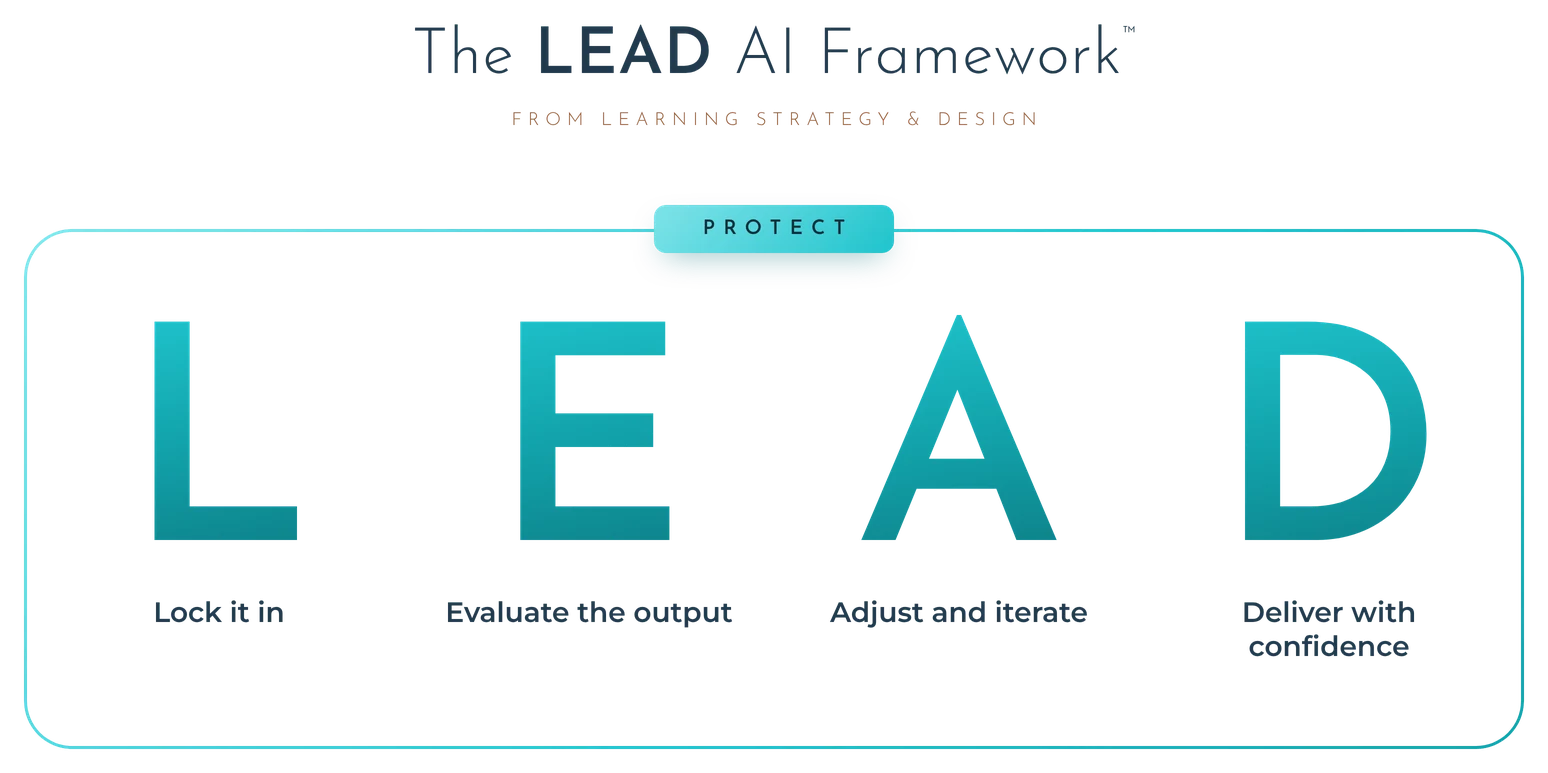
The LEAD AI Framework, created by Jill Davidian of Learning Strategy & Design, is a four-step approach to AI fluency that keeps instructional designers in charge when they work with AI: Lock it in, Evaluate the output, Adjust and iterate, and Deliver with confidence, with Protect around every step.
The principle: The design is yours. AI may draft, you own every fix.
Built from research on how companies use AI and what employers say they need from the candidates they hire.
LEAD AI came out of a change in how employers hire. They want AI skills, and what they care about most is AI fluency that works with any tool and keeps a human leading the work.
I've worked in instructional design for 20+ years. I talk with hiring managers, employers and L&D professionals, and the way they hire is changing. AI skills are becoming more important, especially AI fluency.
My own research says the same thing. Companies want people who know the AI tools they use, but what they really want is AI fluency, and they want that fluency to be tool-agnostic. They're also concerned about their data, their proprietary information and what is being produced by AI. Keeping a human in the loop is really important to them.
The conferences I've attended have put a lot of focus on that concern. How do we oversee and lead this process? How do we, as humans, stay in the loop and stay on top of things? How do we make sure the AI is actually producing good-quality work? At one conference, every session was about how the human stays in the loop and leads the process.
Many people think AI is going to replace jobs. That conference was actually called AI Fails. L&D professionals and managers were there to discuss how AI has failed them and the lessons they learned. Companies like theirs want you to know how to use AI to work more efficiently so you can be a better ID, and that's where AI fluency comes in.
When I realized that many people were trying to learn as many AI tools as they could to add to their resume (instead of really focusing on fluency), I saw the disconnect between what hiring managers are looking for and what career changers, and even professionals in the field, were trying to do to get hired. That is why I created the LEAD AI Framework. You lead the AI tool. It doesn't lead you.
I think of AI the way I think of Storyline. It's a development tool. You'd never take the ID out of the loop and let Storyline build the course, and the same goes for AI.
I build with AI myself, from apps to full interactive courses, so LEAD AI is how I work too.
LEAD stands for the four steps of the framework: Lock it in, Evaluate the output, Adjust and iterate, and Deliver with confidence. Protect sits around all four, the whole time.
The steps run as a loop. What you learn in Adjust and Deliver feeds the next Lock it in. Protect is the boundary the loop runs inside, and it's on at every step.
You move through the four steps every time you work with AI. Protect stays on the whole way through.
Two things happen before AI touches the work.
First, decide. Does AI belong in this task at all, and if it does, which tool? “No AI” is a real answer. So is “the tool my employer allows.”
Then set up what goes in. The output can only be as good as what you give it: the context, the task, the format, examples, and the ground rules for how it works with you, like “push back if I'm wrong.” If there are do's and don'ts the work has to follow, give them as hard rules.
Your source content is part of what goes in, so be really careful where it comes from. A lot of the source content people feed in to create training was generated by AI, and often it's not correct. Make sure you're getting the source content for your courses from quality sources: subject matter experts, or company materials that are well vetted.
What good looks like comes next, in Evaluate.
Evaluate has two parts: knowing what good looks like for this task, and evaluating the output against it. This is where you spot the problems, including writing that sounds like AI. Fixing them comes in the next step.
These questions travel with you to any output, from any tool:
One warning sits over all of them. Polished output is the output people evaluate least.
You make your adjustments based on the evaluation you did in the previous step. Go back and forth with the AI until it's right. Fix output that's wrong or sounds like AI, and know when to push back on the tool and when to fix it yourself.
Feed your fixes back in. Many people make the adjustments on their own and move forward, so the AI tool never knows what they changed. Tell the AI what you fixed, or ask it to make the adjustments. It may take longer at first, but over time it learns the best way to do certain things, and you'll have fewer and fewer adjustments going forward. A good habit to start with: if you make the same fix twice, put it in the instructions.
That doesn't mean you skip Evaluate. You still check the output every time. Just make sure you're either going back and forth with the AI or feeding your fixes back in.
Own it. Whatever you create with AI, once you put it out into the world (hand it to your manager, publish a report, launch a course), it has your name on it, not the AI's. If something falls apart, it falls back on you. At the end of the day, make sure you have ownership over the output, whether you or the AI created it. Employers are watching for this in how people use AI at work.
Be transparent about how you used AI and how you didn't. If your manager, a stakeholder or a hiring manager asks how something was made, you can say what the AI drafted, what you checked and what you changed. That builds trust in your work, because nobody finds out later that AI was involved and wonders what else they weren't told. It also shows the judgment employers are hiring for. Some employers require disclosure (see Governance in Protect), and being open on your own goes further than that.
Protect sits around every step of LEAD AI, the whole time. It covers privacy, confidential and proprietary information, and your employer's rules for AI.
Being transparent in Deliver is your choice to be open. Governance is following your employer's rules, which may also require disclosure.
Each step depends on the one before it, and Deliver feeds the next round.
Lock it in comes first because the output can only be as good as the tool and the context it got. Evaluate comes before Adjust because you can only fix what you've checked against a clear picture of good. Adjust comes before Deliver because only work you've checked and fixed goes out with your name on it.
Deliver closes the loop: what you learned feeds the next Lock it in. Protect sits outside the sequence because it's on the whole time.
The task: draft learning objectives for a short compliance course. Flip between the two prompts to see what changes.
Write learning objectives for a compliance training course on data privacy.
By the end of this course, learners will be able to:
It sounds polished. It doesn't know who the learners are, what the course covers, or what the business needs them to do differently.
You're helping me draft learning objectives. Push back if anything I ask for doesn't make sense. Audience: new call center reps in their first two weeks. They take customer calls with account details on screen. Business goal: reps verify callers before sharing anything. Course: 20-minute eLearning. Outline below, with client details removed. Format: 3 or 4 objectives, each with one observable action and a condition. Example our team liked: “When a caller can't pass verification, choose the right next step from the callback script.” Do's and don'ts for objectives: - Do start each one with an observable action. - Don't start with “understand.” It can't be measured. - Don't start every objective with “Given.” - Don't write objectives the outline doesn't cover. [outline pasted here]
By the end of this course, new reps will be able to:
Much closer, and still yours to check. If the secure portal isn't in the outline, number 3 comes out (Evaluate), and you tell the tool why (Adjust).
Example prompts and outputs, written to show the difference. They aren't from one specific tool.
You paste the topic into a chatbot, copy the objectives it gives you into the storyboard, and move on. They sound polished. Two of them can't be measured, one covers content the course doesn't teach, and the SME's name and a client's internal process are now sitting in a tool your company never approved.
When your manager asks where the objectives came from, the honest answer is “the AI.”
They answer different questions. The Applied ID Portfolio Method is what you build and how you get hired: Think, Build, Iterate, Prove, Land. LEAD AI is how you work with AI along the way, wherever AI shows up in that work.
One word overlaps. The method's Iterate stage is the expert feedback loop: experienced instructional designers give you feedback on every draft, and you revise until the sample is ready for a hiring manager (in AIDA, that's Portfolio-Grade Reviews). Adjust and iterate in LEAD AI is your own back-and-forth with the AI tool while you work. They're two separate loops, and AI-assisted work goes through both.
The Applied AI Levels show how deep your AI use goes, from asking an AI assistant for one piece of your work (level 1) to AI agents that start tasks on their own (level 5). LEAD AI runs across every level.
At level 1 you're evaluating a chat reply. At level 5 you're evaluating what an agent did before you asked. The steps stay the same: lock in the tool and the context, evaluate what comes back, adjust until it's right and deliver work you can stand behind, with Protect around all of it.
A few skills sit next to LEAD AI and get taught on their own.
More on AI in instructional design

Jill Davidian is the founder of Learning Strategy & Design and creator of the LEAD AI Framework and the Applied ID Portfolio Method. Jill has 20+ years in instructional design, including time as a hiring manager. More about Jill
Last updated: November 2026
LEAD AI is taught in the AI for IDs phase of the Applied Instructional Design Academy (AIDA), practiced on the portfolio samples, and carried into the job. Students show how they work with AI on the Working with AI page of their portfolio, in their own words, under each part of LEAD AI. They cite it as “the LEAD AI Framework from Learning Strategy & Design.”
Moving into instructional design now, and hearing that AI is about to take the jobs? You learn LEAD AI right after the ID fundamentals, use it on every sample you build, and walk into interviews with your own examples of how you work with AI.
Jumpstart Your Instructional Design Career
A weekly podcast and a Substack on moving into instructional design, from me.