

Where AI fits in each step of the instructional design process, what it can't do, and the order to learn it in.
Instructional designers use AI to draft, research, script, build and review faster, at every step of the design process. The decisions stay with you: what the learner needs to be able to do, whether the content is accurate, and whether the result is good learning. Learn the instructional design fundamentals first and AI right after, because you can only evaluate what AI gives you once you know what good looks like.
AI shows up in every step: preparing for analysis, drafting objectives and outlines in design, building in Rise and Storyline during development, checking work before review, and sorting results in evaluation. In each step it drafts or checks, and you decide.
AI helps you prepare. It can summarize the source documents a subject matter expert sends over and suggest questions for your kickoff meeting. What it can't do is sit in that meeting and hear what the business needs people to do differently. You decide what the problem is.
AI can draft learning objectives, a content outline and scenario ideas from a good brief. You evaluate every objective against the business goal, cut what doesn't belong and decide how the learning flows. The design document and storyboard carry your decisions, whoever typed the first draft.
Rise AI can build a first draft of a course from your brief. Storyline's AI Assistant helps you build interactions, AI can write the JavaScript for an advanced piece, and AI voices can narrate. You test every trigger, fix what it got wrong and make it sound like a person wrote it.
An AI reviewer can check a storyboard against a rubric, flag reading level and catch places where the script and the screen don't match. You decide which suggestions to take, because some of them will be wrong for your learners.
AI can sort open survey comments into themes and draft quiz items for a revision. You decide what the results say about the training and what changes next.
The process itself doesn't change. AI makes several of the steps faster, and every one still needs an instructional designer's judgment. If you're new to what the job involves, what is instructional design walks through the work itself.
AI can't decide what a learner needs, get the real expertise out of a subject matter expert, evaluate whether a draft is good learning or keep company information out of the wrong tool. Those are the instructional designer's job.
Instructional design is understanding how people learn, getting what's in a subject matter expert's head into something a learner can use, and designing for a change in what people do on the job. AI can help with pieces of that. It can't do the thinking behind it.
Give AI a strong brief and you get a usable draft. Give it nothing and you get generic training, the kind you can spot from a mile away because it reads like AI wrote it. Somebody has to decide what to ask for and evaluate whether what comes back is accurate and good learning, and that's the instructional designer's job.
There's one more thing AI won't do for you: keep company information safe. Part of working with AI on the job is knowing what you can't paste into a tool, and following your employer's rules about which tools are allowed.
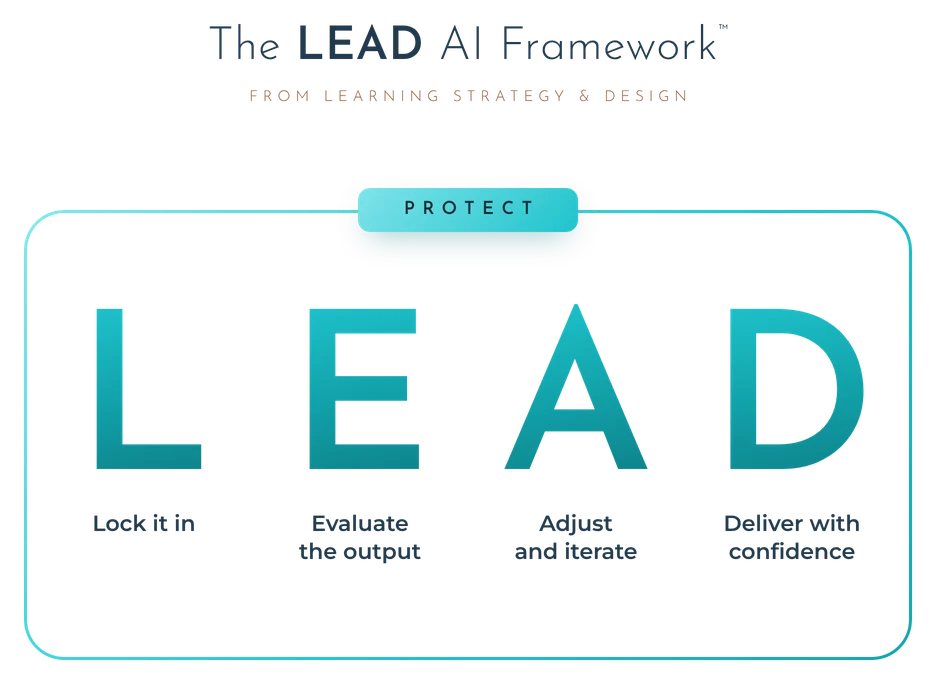
Follow a process every time: decide whether AI belongs on this piece and brief it well, evaluate what it gives you for accuracy and learning quality, revise it until it's right, and own the result. The LEAD AI Framework is that process, with protecting private and company information around every step.
I think about AI the way I think about Storyline. It's a development tool. You'd never take the instructional designer out of the loop and let Storyline decide what a course should teach, and AI works the same way.
The way I teach it is the LEAD AI Framework™ for instructional designers, from Learning Strategy & Design. Lock it in: decide whether AI should touch this piece at all, pick the tool, and brief it with the context it needs. Evaluate the output: read what comes back two ways, is it true and is it good learning. Adjust and iterate: work with it, override it when your expertise says it's wrong, and edit out anything that sounds like AI. Deliver with confidence: your name goes on it and you can explain every choice. Protect wraps around all four.
Far enough to direct AI and evaluate what it gives you on real work. I teach it as the Applied AI Levels from Learning Strategy & Design, five levels that go from asking an AI assistant for one piece of your work to AI agents that start tasks on their own.
Some days you're chatting with an AI assistant to rewrite a paragraph. Some days the AI inside Rise is drafting your whole course. And some learning platforms now run AI agents that put training together on their own. Those are different skills, and each one builds on the one before it, so I laid them out in order.
You chat with an AI assistant for one piece of your work: learning objectives, scenario ideas, a rewrite, research on a new topic. It knows little about you or your project, so you give it context each time and evaluate what comes back.
You use the AI inside the tools you design in. Rise AI drafts your objectives and a first version of your course, and Storyline's AI Assistant is your help desk while you build. You evaluate everything before a learner sees it.
AI helps you create a whole deliverable, like a design document or storyboard, from real context about you and your project, set up once or read from your files. You evaluate the draft and feed your changes back, so it gets better every round.
You create things with AI that you couldn't make on your own, like a branching scenario inside your course, a simulation of a system your learners use, an interactive explainer video or a roleplay where learners practice a hard conversation. You still make every design call.
AI agents connected to your tools start the work on their own, on a schedule or when something happens, like drafting a design document after every new SME interview. You design the system and evaluate what it produces.
The levels show how deep your AI use goes, and the LEAD AI Framework is how you stay in charge at any depth. You don't need to be techy to start, since level 1 is a chat window. Applied Instructional Design Academy (AIDA) takes you through levels 1 to 3, with a glimpse of level 4.
The core of the job is judgment about how people learn, and AI needs someone to brief it and evaluate it. Most job postings I reviewed this spring didn't mention AI at all, and AI is creating new training needs as companies adopt it.
This is the question I hear more than almost any other right now. When I looked at 60 instructional design job postings this spring, 8 mentioned AI at all. The other 52 asked for what they've always asked for: the design process, working with subject matter experts, design documents and storyboards, Storyline and Rise.
AI is also creating training work. Every time a company rolls out a new tool, people need to learn it, and AI is a lot of new tools. What gets an instructional designer passed over is standing still while the field changes around them.
AI amplifies how a company already was. Companies that value good learning use it to take on the parts of the job that aren't instructional design, so their IDs can do the design work. Companies that never cared about training were building it without IDs long before AI, and IDs still had jobs. The full answer, with the job posting data, is in its own post.
They want to hear a real AI workflow, including how you evaluate AI's work, and they want to see it in your portfolio. Naming a tool you've tried once doesn't answer the question.
Expect the question "How do you use AI in your work?" in your interviews. The answers that stand out describe a real workflow from start to finish: what you asked for, how you evaluated it and what you fixed. The strongest ones add a time AI was confidently wrong and how you caught it, because that shows you supervise the tool.
Hiring managers also look for proof in the portfolio. AIDA graduates build a Working with AI page that shows how they used AI on real samples, drawn from a log they keep while they build. You can do the same thing on your own: every time you use AI on a piece of work, write down what you asked, how you evaluated it and what you changed.
Rise AI and Storyline's AI Assistant inside Articulate 360, a general AI assistant for drafting and research, and AI voices for narration. The tool matters less than knowing how to brief it and evaluate it.
Tools change fast, so learn the thinking first. Right now the ones that come up most in corporate instructional design are:
The full tool stack, AI and otherwise, is on the software page.
Learn the instructional design fundamentals, then the AI fundamentals, then practice both on real samples while you keep a record of how you evaluated AI's work. Fundamentals first is what lets you tell good AI output from bad.
In order. First the instructional design fundamentals: adult learning, objectives, assessments, how a corporate project runs. Then the AI fundamentals right after: how AI works, how to brief it, how to evaluate it and how to keep information safe. Then you use both on real portfolio samples, so every piece shows the core ID skills and the AI skills together.
AIDA teaches it in that order, and it's the order I'd follow on your own. Starting with AI and skipping the fundamentals leaves you with no way to tell whether what it gave you is any good. From there you go one level at a time, through the Applied AI Levels.
I build with AI myself, from apps to full interactive courses, so what I teach about it comes from doing it. I share what I'm building as I go.
More on AI in instructional design

Jill Davidian is the founder of Learning Strategy & Design and creator of the Applied ID Portfolio Method. 20+ years in instructional design, including time as a hiring manager. 1,200+ AIDA graduates. More about Jill
Last updated: November 2026
Inside AIDA, you learn AI right after the instructional design fundamentals and use it on every portfolio sample, with a mentor reviewing the work.
See AI in AIDAJumpstart Your Instructional Design Career
A weekly podcast and a Substack on moving into instructional design, from me.